
Welcome to the SecureLink developer hub. You'll find comprehensive guides and documentation to help you start working with SecureLink Online API-based invoicing service as quickly as possible, as well as support if you get stuck. Let's jump right in!
Here, we will describe what you will need to get started integrating the AllSecure Online API-based invoicing service (SecureLink) and the key data elements you will use to identify yourself to the platform.
By now, you should have been provided with an SecureLink Portal login. If you have not been provided with this login, please contact AllSecure Helpdesk. We will initially create your SecureLink profile and provide you with your login details, and if requested, x-api-user and x-api-key required for payment link generation via our API.
Create an Invoice
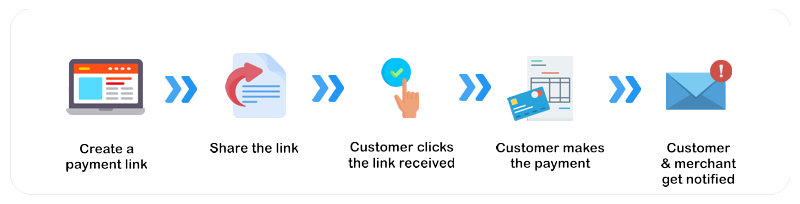
Now that an access token and api username has been provided, you are now able to create invoices in the SecureLink system. To accept a payment from a customer, an order is always required so that we have something to interact with in all our API interactions with the gateway, and on the Portal user interface.
To create a payment link, the Merchant must send a POST request to the following endpoint.
| HTTP Request Method | POST |
| Endpoint URL | https://test.link.allsecure.xyz/api/v1/generate |
Headers
The following should be the content of the header of your request.
| Header | Value |
|---|---|
| x-api-key | "api-key" as received from AllSecure |
| x-api-user | "api-user" as received from AllSecure |
| Content-Type | application/json |
Body
There is a list of the attributes and their explanations , which are sent in the request body.
Response
The response received contains an "paymentUrl" of the payment link created. To read more about other Response Parametters please check the following page .
Share the link with the consumer
You are free to share our links via any channel. You can paste the links via email, SMS, Social Media messages or chat, print or convert the link into a QR code. As soon as the merchant receives the "paymentUrl" from create payment link, the link is available for consumption.
Customer using the link
Typically, the customer will receive a basic order information together with the link. There should be an information on the merchant, order details and possibly a short instruction on how to effect the payment. The only thing remaining is for the customer to clicks the link that will forward him/her to the payment page.
Payment of the Invoice
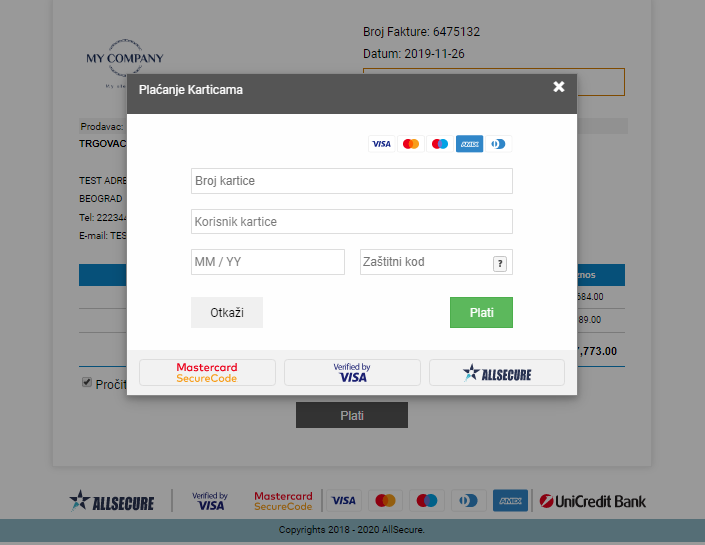
The payment page presented to the customer with an option to review the order and enter payment details in a secure way. The page contains the details of the merchant, customer and the full invoice. All this shown in order to confirm to the customer on what exactly he/she is paying and to whome.
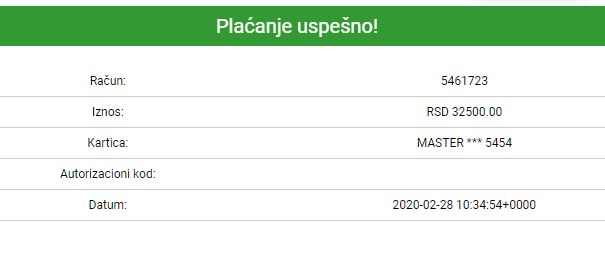
If the payment was successfull, customer will be presented with a status page that includes all relevant transaction details.
A separate email confirmation will be sent to customers email addressse. A copy of this email confirmation is sent to a merchant.