
New invoice is created by using Invoice -> New Invoice link on the top menu.
The Invoice creation process is simple. User will be requested to enter all relevant details in the electronic invoice form as shown below:
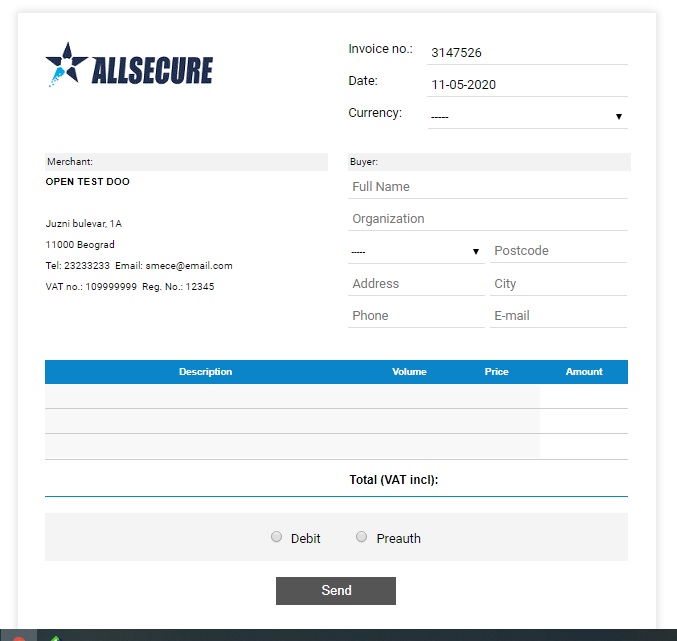
Please keep in mind that most of the fields are mandatory. some fields, such as Invoice number and invoice date are pre-populated, but may be changed by the user according to its needs.
Customers data are all mandatory (except Company name). It is very important that customers email address is correct, as it will be used for all customer communication in regards to sending the link for the payment and payment receipts.
It is expected that at least one line is filled with the products/services info. Amounts and Totals are automatically calculated based on the users input.
Finally, the user is to choose if the future transaction is to be Purchase (or Debit) or Deferred Purchase (i.e. Preauthorization). If the transaction is Preauthorization, the user is to Capture or Void this preauthorization after the product is shipped/delivered. Typically, Purchase is used for services and Preauthorization is used for products that are to be delivered.
Once the form is filled, and the button "Send" is selected, the invoice will be generated and displayed. To collect the payment link, the user may choose the "Copy Link" button (recommended) and the link can be afterwards pasted to email message, or a skype / viber / whatsup or any other communication or social application or Text message.
Alternatively, by choosing "Send email" button, an email with the link will be sent to the customers email.